
Six Things for Veterinary Professionals to Know about AI
The difference between the right tool and the almost-right tool is the difference between

You already use AI and you’ve gotten the hang of it. You have an LLM app on your phone. You don’t ask who Claude is anymore, you don’t think that your friend at Google got into astrology, and you know there’s more to Perplexity than being confused.
The scribe runs, the SOAP note appears, you fix two things, you sign it. Great. You have successfully used an AI tool in veterinary practice. You’re a tech wizard. You might even get that printer working later.1
But “AI” is not one tool. It’s a category of tools in a larger toolbox, and right now many of us are using the hammer for everything. Screws, bolts, drywall anchors, and the occasional jar of peanut butter? Grab hammer, swing hard. It works, sort of, until it doesn’t, and then we blame the hammer.
Hammer use has become sufficiently widespread in veterinary medicine as to merit refining the conversation. Here are six tools that I think you should know, I’ll tell you what each one does, show you what it looks like in practice, and when to put it down and pick up a different one.
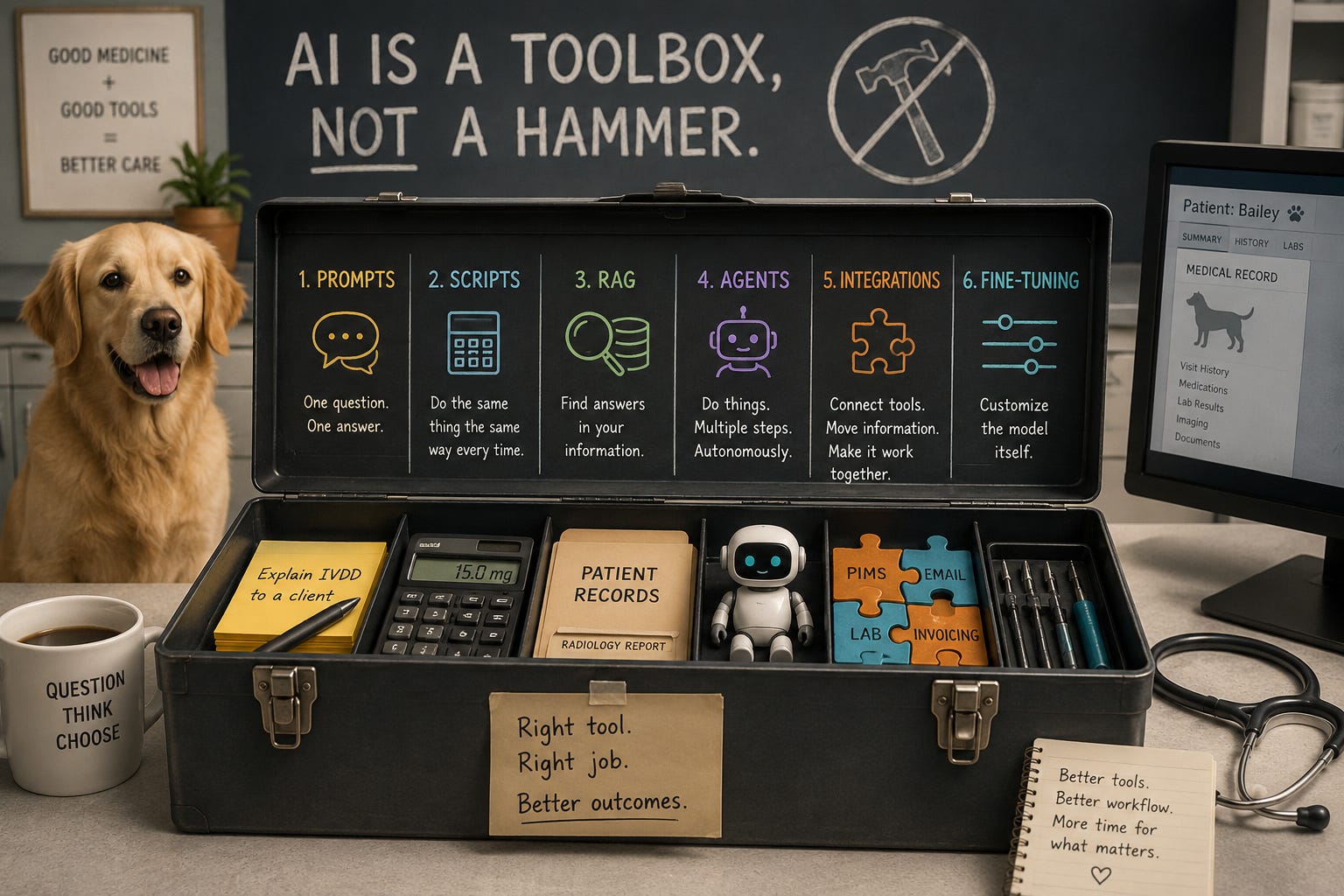
1. Prompts
The thing you’re already doing when you interact with a large language model.
A prompt is one question, one answer. You type something, the model responds, you do something with what it gave you. That’s it. No memory of last time. No connection to your records. Just a conversation.
It’s good at: Anything where you need the model to think once, especially about something specific. Rewriting a client email so a layperson can understand it. Brainstorming a differential for a weird presentation. Summarizing a journal article you don’t have time to read. Explaining a complex diagnosis using a football analogy because you know your client — but maybe not football — and you know what’s going to land.
It’s bad at: Anything you need done exactly the same way twice. A prompt doesn’t remember what you told it yesterday (it could in the right circumstances, but don’t take it for granted). It can’t reach into your records. It can’t send emails. It generates text, presents it to you, and its job is done.
The skill that makes this useful: Want a better answer? Ask better questions. It sounds snarky and glib, but it’s most of what works.
“Write a discharge summary” gets you something generic and vaguely robotic. You know the voice — the em dashes,2 the word “commendable,” the phrase “it’s not just a X, it’s a Y.” Your clients, who, unless we’re neighbors, are somewhat unlikely to be Amish, know that voice too.
But type something like: “Write a discharge summary for a 7-year-old neutered male Golden Retriever presenting for acute vomiting, diagnosed with foreign body obstruction on rads, treated with exploratory laparotomy and enterotomy, recovered uneventfully, discharging on tramadol and metronidazole with recheck in 10 days. I’ve attached the radiology report, surgery report, and pre-anesthetic lab results. Sixth-grade reading level, warm and reassuring, and for the love of all that’s decent don’t say ‘furry family member.’”
That gets you something you’d actually send home. Well, it gets me something that I would actually send home with a specific patient. You’d want to tailor your prompt to suit your own use case.
Something to try: Take the last discharge summary you wrote. Paste it into a paid version of Claude or ChatGPT and type: “Rewrite this at a 5th-grade reading level. Keep the medical accuracy, but minimize the jargon or explain it where it can’t be avoided. Make it sound like a kind but professional veterinarian, not a robot trying to human. Remove any instructions on which the client can’t act.”
Then compare the final output to what you sent home. Then rewrite the prompt (iteration is crucial); add your preferred tone, specify the structure, tell the model what to include and leave out, and notice how the output changes. Try it in a new chat in incognito mode to see how the outputs differ. Now you’re a prompt engineer using the same model but with better instructions you’re seeing a dramatically better result.
2. Scripts
The calculator. No thinking, just math.
A script is code — a few lines of Python, a spreadsheet formula, whatever — that does the same thing the same way every single time. No judgment. No creativity. If the input is 30 kg and the dose is 0.5 mg/kg, the output is 15 mg. Always.
What it’s good at: Anything where the answer should never vary. Drug dose calculations. Reformatting lab imports. Generating a weekly inventory report. Sending automated appointment reminders. Reconciling end-of-day payments. The logic is “always do exactly this,” and you want it done exactly that way forever.
What it’s bad at: Judgment calls. A script can calculate that the metoclopramide dose for a 30 kg dog is 15 mg. It cannot decide whether metoclopramide is the right drug given a patient’s cardiac history and concurrent meds. That’s what the doctor (sometimes with the help of an AI model) is supposed to be doing.
Why you should care even though you’re not a coder: Two reasons. First and most importantly: AI can write scripts for you now. You can describe a calculation to Claude in plain English and have working code in 30 seconds. You don’t need to know Python, need to know what you want calculated. You don’t always need to know how to do it.
Second and this one matters too: the script runs without the AI. No hallucination risk, no variability. The dose is the dose is the dose. It’s calculated. It’s deterministic. For anything where you want the exact same result every time, a script is safer, faster, and way cheaper than asking a language model.
Example you can try right now: Open Claude and type: “Write me a Python script that takes a patient’s weight in kg and a drug dose in mg/kg and calculates the total dose in mg, the volume to draw up given a concentration in mg/mL, and flags if the dose exceeds a maximum I set.” You’ll have a working drug calculator in under a minute and it’ll never hallucinate.
3. Agents
A model with a to-do list.
An agent is an AI that works in a loop. Unlike a prompt where you ask one question and get one answer, an agent takes a goal and figures out the steps: look at this, decide what to do, do it, check the result, move to the next thing. It can call tools along the way. It keeps going until the job is done.
If a prompt is asking the model a question, an agent is giving the model a mission.
What it’s good for: Multi-step work that requires judgment at each step. Say it’s 6 AM, you have four surgeries on the schedule. You (or a predetermined script) tell(s) the agent: “Go through today’s surgical patients. For each one, confirm pre-anesthetic bloodwork is on file and less than 30 days old (if it’s not, determine the date of the most recent bloodwork), check that a signed consent form is in the record for this procedure, pull up the patient’s current medications, and flag anything that should have been held pre-op.” The agent opens the first chart. Checks the bloodwork date, finds that everyone’s is current. Finds the consent forms, all signed. Reads the med lists, notes the patients on carprofen and flags that it wasn’t held for two of the patients. That’s not one question. That’s a loop of clinical decisions, and you get a summary before rounds instead of discovering the missing consent form when the client is already in the lobby.
Other examples may include scanning lab results as they arrive and alerting you to critical values. Going through today’s records, finding any patients discharged on NSAIDs without a documented renal value in the last 90 days, and flagging them. Processing a referral by pulling the patient history, summarizing the case, and drafting the letter.
What it’s bad for: Simple questions (that’s a prompt) and fixed calculations (that’s a script). Don’t deploy an agent to calculate a drug dose. The overhead and setup isn’t worth the time. To set up an agent to do something like I’ve just described, you would need some time for set up and testing. And more autonomy means more ways things can go sideways.
It’s not a quick fix for all that ails the hospital. But it could be darned useful if you take the time to do it right.
The critical rule: As ever, an agent is a tool. It is not a replacement for the sensible checks and balances that exist in clinical medicine. The safe setup is the agent does the work, presents the result, and waits for you to say “yes.” You’re the pilot. The agent is the eager intern co-pilot who runs the checklists and sets everything up, then waits for your clearance.
Example you can try today: If you use Claude and connect it to your email and calendar, try: “Look at my inbox, find any emails from clients in the last 48 hours that mention their pet vomiting or not eating, and summarize each one with the pet’s name and what’s going on.” That’s an agent loop: it searches, reads each email, makes a judgment about relevance, extracts the information, and compiles a summary. Small-scale, but that’s the mechanic. The surgical pre-check above is the same pattern applied to clinical systems.
4. MCP (Model Context Protocol)
The thing that gives the model access.
An MCP connection is what lets the model reach into a real system — that system could be your email, your calendar, your lab platform, a research database — and actually interact with it. Without MCP, the model can only work with what you paste into the conversation. With MCP, it can go get things itself.
What it’s good for: Anytime the model needs information that lives somewhere else. Things like patient records, lab results, the schedule, an email thread, a journal article, and so on. If the data isn’t in the conversation already, setting up access via an MCP is the way to get it done.
What it looks like in practice: I use MCP for too many things to mention. Claude connects to my Gmail, Calendar, Drive, Slack, Notion, and PubMed. I can say “Find the email from the urgent care about the splenectomy referral, I think the dog’s name was a dessert, pull the original bloodwork from my Drive, and search PubMed for the latest metronomic cyclophosphamide protocols.” And it does all of that in one conversation. Four systems, one instruction, no tab-switching! It saves an incredible amount of time and Mochi the spleenless pit bull is the only one happier than me about it.
Why this is the big deal: MCP is what turns AI from a drafting assistant into something that actually can be molded into your workflow. Without it, the model drafts a beautiful discharge summary and you copy-paste it into a text field. With it, the model drafts the summary and writes it to the record. Without it, the model suggests reorder quantities and you type them into inventory. With it, the model checks stock, calculates reorder points, and generates the purchase order for you to approve.
That gap between “AI helped me write this” and “AI did this inside the system I actually work in” is closed by the Model Context Protocol.
Example you can try right now: If you haven’t connected your LLM of choice to your email or calendar, do it. It takes about two minutes in Settings. Then try: “What’s on my schedule tomorrow and are there any emails I haven’t replied to from this week?”3 That’s MCP in action — the model reaching into two live systems, pulling real data, and giving you a useful answer. Once you see it work, you’ll immediately start thinking about what else you’d want it connected to.
5. RAG (Retrieval-Augmented Generation)
The model’s reference shelf.
RAG is a setup where you give the model a library of reference documents — your formulary, your clinic’s SOPs, a collection of journal articles, your controlled substance protocols — and build a search system so the model can look things up when it needs them. It doesn’t memorize your protocols. It looks them up, every time, right when it needs them.
How it’s different from MCP: Easy to mix these up, and it matters, so here’s the analogy:
MCP is the phone on the wall. You pick it up and you’re connected to something live. Imagine calling the lab, the front desk, the pharmacy’s inventory system. The information on the other end changes by the minute. Fluffy Henderson’s potassium result wasn’t there an hour ago; now it is.
RAG is the protocol binder on the shelf by your desk. Your IRIS staging criteria, the anesthesia protocols, federal and state controlled substance SOPs. That binder doesn’t change when a patient walks in. It’s your vetted, accumulated knowledge — the stuff you’ve decided is correct — organized so you can find it fast.
You don’t call the lab to find out how to stage chronic kidney disease. You don’t open the protocol binder to find out Fluffy Henderson’s potassium. Same information ecosystem, completely different jobs.
MCP gets you the patient’s data. RAG gets you the protocol for interpreting it.
What it’s good for: Anytime the model needs your specific knowledge, not just general medical knowledge. Language models know a lot of medicine. They also hallucinate drug doses, confuse species-specific protocols, and confidently cite guidelines that don’t exist. RAG solves this by grounding the model in your vetted material. The model doesn’t guess what your NSAID protocol says, instead it retrieves the actual document and reasons from it.
Imagine having your vetted, consolidated, collected anesthesia protocols, searchable when the model is helping plan a procedure. Or your controlled substance SOPs, surfaced when a tech asks a compliance question. A curated collection of JAVMA articles on the condition you’re treating, so the model cites real evidence instead of generating plausible-sounding claims.
When it’s overkill: If your formulary fits on two pages, just paste it into the prompt. Or make a spreadsheet. RAG earns its effort when the knowledge base is too big to fit in a single conversation, as in where there are hundreds of pages of protocols, thousands of articles, years of case records.
Example to understand the concept: You know the “upload a PDF and ask questions about it” feature in Claude or ChatGPT? That’s a simplified version of the same idea. The model reads the document you gave it and answers from that instead of from memory. RAG is the industrial-strength, organized version with hundreds of documents, always available, automatically searched. But the principle is the same: ground the model in your material instead of trusting its training data.
6. Skills
The playbook you don’t have to explain twice.
I mostly use Claude for my LLM use.4 A skill is a reusable set of instructions that makes the model reliably excellent at a specific task. If a prompt is a one-off question, a skill is the recipe card you laminated and stuck to the wall. It tells the model what to include, what format to use, what tone to hit, and what mistakes to avoid — every time, without you re-explaining it.
What it’s good for: Any task you’ve figured out and want done the same way consistently. You’ve dialed in exactly how you want discharge summaries — the structure, the reading level, the follow-up instructions, the voice that sounds like you. Instead of re-explaining all of that every time, you encode it as a skill. Now anyone on your team can invoke “discharge summary” and get output that matches your standards without knowing how to prompt.
Other examples: a SOAP note skill tuned to your emergency workflow. A client callback skill that summarizes the case at a lay reading level. A referral letter skill with your preferred structure and clinical voice. A controlled substance reconciliation skill.
When to skip it: When the problem is genuinely new. Skills encode what you already know works. For something you’ve never dealt with before, you want the model’s full reasoning, not a constrained playbook. Use a prompt, solve the problem, and then — if you’ll see it again — build the skill.
Example you can try right now: Take a task you do regularly — say, writing post-op callback notes. Write out every instruction you’d give a new associate about how you want it done: what to include, what to skip, what tone, what reading level, how to handle complications vs. routine recoveries. Paste those instructions at the top of a prompt and then paste a medical record below them. What you get back will be dramatically better than an unprompted request — and those instructions are now the first draft of a skill.
How They Fit Together
None of these tools replaces the others. They stack.
Picture this: You’re closing out your day. You invoke a skill — “end-of-day reconciliation” — that you built last month. It loads your standards for what to check and how to report it. That triggers an agent that loops through today’s patients. The agent reaches through MCPs into your records, your lab system, and your inventory. For the renal case in Room 2, the agent notices a creatinine of 4.8 and searches your RAG library to pull your clinic’s CKD staging protocol — grounding its assessment in your document, not its training data. For the inventory check, it calls a script that calculates reorder quantities from your trailing 30-day usage — a deterministic calculation, no AI judgment needed. Throughout the whole process, the agent uses prompts within the skill’s framework to assess each record, draft follow-ups, and compile a summary.
Fifteen minutes. Zero tab-switching. You reviewed and approved every output. The model did the work. You made the decisions.
Every component of that workflow exists today. And you don’t need all six on day one. Start where you are — better prompts, a script for your most tedious calculation, connecting Claude to your email — and build up as the problems get more interesting.
You don’t have to use all of the tools or even some of the tools, but you should know how they work, which one you’re reaching for, and why.
Which would make one of us.
I’ve long used en-dashes incorrectly, and I’ve debated keeping them wrong in my writing because it makes my writing looking less like it’s been AI-generated. I’ve caved to proper grammar, this time. Blame my Catholic school education.
I would need to be MUCH more specific. The model’s answer to that would far exceed the context window.
Opus 4.6. None of that “Adaptive” bullshit for me.
These-are helpful prompt techniques. Gonna try them tonight for my sister’s dog with a weird, repeating cutaneous reaction to a lepto vac. (Its always family members or techs that get weirdness :))